Operational Forecast System (OFS) Frequently Asked Questions (FAQs)
- What OFS do you run, and how often are they updated?
- What are nowcasts and forecasts?
- What do the output files contain?
- How can I check the output file parameters and their attributes?
- What is the OFS model output file naming convention?
- Where can I access the OFS model output files?
- What is the difference between the output file’s timestamp and the simulation time, and how can I extract simulation time information?
- Where can I find technical documents on the development or skill of the OFS?
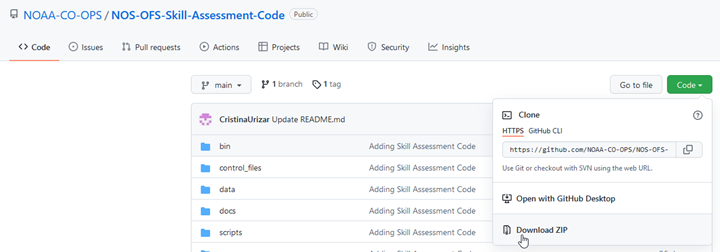
- Where can I find the NOS skill assessment code?
- How can I aggregate or subset OFS data?
- Can I automate OFS data extraction using a URL or API?
- How can I reproduce the water level graphics on your website?
- Could you provide the model grid shapefile for an OFS model?
- Which files do I use when building a time series longer than a single run cycle?
- How do I convert U and V winds from ROMS local coordinates to Earth coordinates (true East-North winds)?
- How do I convert ROMS model vertical coordinates (e.g., sigma or s levels) to z-levels?
- More information on FVCOM-based OFS
- More information on ROMS-based OFS
An Operational Forecast System (OFS) consists of the automated integration of observing system data streams, hydrodynamic model predictions, product dissemination and continuous quality-control monitoring. State-of-the-art numerical hydrodynamic models driven by real-time data and meteorological, oceanographic, and/or river flow rate forecasts form the core of these end-to-end systems. The OFS perform nowcast (over the past 6 or 24 hrs) and short-term (48 to 120 hrs) forecast predictions of pertinent parameters (e.g., water levels, currents, salinity, and temperature) and disseminate them to users.
Nowcasts and forecasts are scientific predictions about the present and future states of water levels, currents, and other relevant oceanographic variables, such as salinity and temperature in a coastal area. A nowcast starts from the end states of the previous cycle nowcast. A forecast is usually initiated by the results of a nowcast. For more information, see the FAQ section “What are nowcasts and forecasts?”
OFS outputs include time series for water levels, currents, water temperature, and salinity (if applicable) for:The naming conventions for each type of output are listed below.
Before August 2024, the naming conventions for model output files were:Where OFS is the name of the OFS (e.g. cbofs, sfbofs), CC is the cycle of the day (run cycle, e.g., 00, 06, 12, etc.), YYYYMMDD is the date of the model run (year month day, e.g., 20231219), HHH is the nowcast or forecast hour for fields files(e.g., 001, 002, etc.), and [nowcast/forecast] or [n/f] denotes either the nowcast or forecast results.
The output files are in NetCDF (.nc) format, and the coordinate system of the NetCDF files is NAD83 (North American 1983). Times are in UTC. More information on the OFS file naming convention is available in the FAQ section “What is the OFS model output file naming convention?”
OFS FAQs
| OFS Name | Full OFS Name | Core Model | Cycles/Day | Cycle Hours | Length of Nowcasts (hrs) | Length of Forecasts (hrs) | Temporal Resolution of Fields | Start Time of Cycle (UTC) | Post Time on NOMADS (UTC) |
|---|---|---|---|---|---|---|---|---|---|
| CBOFS | Chesapeake Bay OFS | ROMS | 4 | 00,06,12,18 | 6 | 48 | Hourly | [00|06|12|18]:42 | [01|07|13|19]:22 |
| CIOFS | Cook Inlet OFS | ROMS | 4 | 00,06,12,18 | 6 | 48 | Hourly | [00|06|12|18]:50 | [01|07|13|19]:45 |
| DBOFS | Delaware Bay OFS | ROMS | 4 | 00,06,12,18 | 6 | 48 | Hourly | [00|06|12|18]:40 | [01|07|13|19]:10 |
| GoMOFS | Gulf of Maine OFS | ROMS | 4 | 00,06,12,18 | 6 | 72 | Every 3 hours | [01|07|13|19]:00 | [01|07|13|19]:25 |
| LEOFS | Lake Eerie OFS | FVCOM | 4 | 00,06,12,18 | 6 | 120 | Hourly | [01|07|13|19]:50 | [02|08|14|20]:15 |
| LMHOFS | Lake Michigan and Huron OFS | FVCOM | 4 | 00,06,12,18 | 6 | 120 | Hourly | [01|07|13|19]:50 | [02|08|14|20]:30 |
| LOOFS | Lake America OFS | FVCOM | 4 | 00,06,12,18 | 6 | 120 | Hourly | [01|07|13|19]:50 | [02|08|14|20]:20 |
| LSOFS | Lake Superior OFS | FVCOM | 4 | 00,06,12,18 | 6 | 120 | Hourly | [01|07|13|19]:50 | [02|08|14|20]:40 |
| NGOFS2 | Northern Gulf of America OFS | FVCOM | 4 | 03,09,15,21 | 6 | 48 | Every 3 hours | [03|09|15|21]:00 | [04|10|16|22]:10 |
| SFBOFS | San Francisco bay OFS | FVCOM | 4 | 03,09,15,21 | 6 | 48 | Hourly | [03|09|15|21]:25 | [03|09|15|21]:50 |
| SSCOFS | Salish Sea and Columbia River OFS | FVCOM | 4 | 03,09,15,21 | 6 | 72 | Hourly | [03|09|15|21]:50 | [04|10|16|22]:52 |
| TBOFS | Tampa Bay OFS | ROMS | 4 | 00,06,12,18 | 6 | 48 | Hourly | [00|06|12|18]:57 | [01|07|13|19]:12 |
| WCOFS | West Coast OFS | ROMS | 1 | 03 | 24 | 72 | Every 3 hours | 03:00 | 03:18 |
| OFS Name | Full OFS Name | Core Model | Cycles/Day | Cycle Hours | Length of Nowcasts (hours) | Length of Forecasts (hours) | Temporal Resolution of Fields Output Files | Start Time (UTC) | Post Time on NOMADS (UTC) |
|---|---|---|---|---|---|---|---|---|---|
| NYOFS | New York and New Jersey OFS | Princeton Ocean Model (POM) | 4 | 05,11,17,23 | 6 | 48 | Hourly | [05|11|17|23]:30 | [05|11|17|23]:58 |
| SJROFS | St. John’s River OFS | Environmental Fluid Dynamics Code (EFDC) circulation model | 4 | 05,11,17,23 | 6 | 48 | Hourly | [05|11|17|23]:50 | [05|11|17|23]:55 |
 Different OFS can have different model cycles times for each day, and different forecast guidance lengths. For example, the West Coast OFS (WCOFS) has only one model cycle each day at 03Z, and provides forecast guidance out to +72 hours. The Lake Erie OFS (LEOFS) has four cycles each day at 00Z, 06Z, 12Z, and 18Z, and provides forecast guidance out to +120 hours.
See the FAQ section “What OFS do you run, and how often are they updated?” section for more information on cycle times, the length of nowcasts and forecasts for each OFS, and the temporal resolution of fields files.
Different OFS can have different model cycles times for each day, and different forecast guidance lengths. For example, the West Coast OFS (WCOFS) has only one model cycle each day at 03Z, and provides forecast guidance out to +72 hours. The Lake Erie OFS (LEOFS) has four cycles each day at 00Z, 06Z, 12Z, and 18Z, and provides forecast guidance out to +120 hours.
See the FAQ section “What OFS do you run, and how often are they updated?” section for more information on cycle times, the length of nowcasts and forecasts for each OFS, and the temporal resolution of fields files.
"ncdump -h filename" to display all the parameters and their attributes;
cbofs.t06z.20250304.fields.n002.nc - 3-D fields nowcast file 4 hours before current cycle time (06z)
…
cbofs.t06z.20250304.fields.n006.nc - 3-D fields nowcast file at the current cycle time (06z) and cbofs.t06z.20250304.fields.f001.nc - 3-D fields forecast file 1 hour after current cycle time (06z)
cbofs.t06z.20250304.fields.f002.nc - 3-D fields forecast file 2 hours after current cycle time (06z)
…
cbofs.t06z.20250304.fields.f048.nc - 3-D fields forecast file 48 hours after current cycle time (06z) Another way to view this time sequence visually is below. For a model run at cycle 06z, or 0600 UTC, the following output files contain model results for these specific times:
 NOTE: The n000 fields nowcast file is a duplicate of the final fields nowcast file (n006, for all OFS except WCOFS) of the previous cycle. The f000 fields forecast file is a duplicate of the n006 (for all OFS except WCOFS) fields file of the same cycle. OFS that use ROMS as their core model (such as CBOFS and WCOFS) do not output n000 or f000 to avoid this duplication, while FVCOM-based OFS do output the redundant n000 and f000 files.
Additionally, some OFS output 3-D fields files every 3 hours instead of hourly, which is reflected in the output file names; these OFS also output 2-D surface fields files hourly. See the table in FAQ section “What OFS do you run, and how often are they updated?” for more details on each OFS.
For the same cycle, stations files look like:
NOTE: The n000 fields nowcast file is a duplicate of the final fields nowcast file (n006, for all OFS except WCOFS) of the previous cycle. The f000 fields forecast file is a duplicate of the n006 (for all OFS except WCOFS) fields file of the same cycle. OFS that use ROMS as their core model (such as CBOFS and WCOFS) do not output n000 or f000 to avoid this duplication, while FVCOM-based OFS do output the redundant n000 and f000 files.
Additionally, some OFS output 3-D fields files every 3 hours instead of hourly, which is reflected in the output file names; these OFS also output 2-D surface fields files hourly. See the table in FAQ section “What OFS do you run, and how often are they updated?” for more details on each OFS.
For the same cycle, stations files look like:
cbofs.t06z.20250304.stations.nowcast.nc - 6 minute interval stations nowcast file for the entire OFS run (cycle 06z)
cbofs.t06z.20250304.stations.forecast.nc - 6 minute interval stations forecast file for the entire OFS run (cycle 06z)
| Output Type | NOMADS Data at NCEP and NCEP FTP | CO-OPS THREDDS Data Service | AWS NOAA Open Data Dissemination S3 Bucket | NCEI THREDDS and NCEI Web Service* |
|---|---|---|---|---|
| Station nowcast and forecast files | Most recent 24 hours | Most recent 31 days | Most recent 2 years | >5 years |
| 3D field nowcast file | Most recent 24 hours | Most recent 31 days | Most recent 2 years | >5 years |
| 3D field forecast file | Most recent 24 hours | Most recent 31 days | Most recent 2 months | None |
| 2D surface layer field nowcast file** | Most recent 24 hours | Most recent 31 days | Most recent 2 years | >5 years |
| 2D surface layer field forecast file** | Most recent 24 hours | Most recent 31 days | Most recent 2 years | >5 years |
| 3D fields on a regular grid | Most recent 24 hours | Most recent 3 days | Most recent 3 days | None |
**Hourly 2D surface layer fields files are only available for OFS that output 3-hourly 3D fields files (WCOFS, GoMOFS, and NGOFS2) NOTE: As of January 1, 2025, the file directory structure on the AWS S3 bucket is /OFS/netcdf/YYYY/MM/DD, where
ncdump -v ocean_time cbofs.t12z.20250306.fields.f011.ncocean_time = 289695600
                        # Get the initialization date and assign it to dt0
                        dt0 = parser.parse(data_set.ocean_time.attrs['units'].replace('seconds since ',''))
                        # Add time (in seconds) to the initialization date to get the time of the model output, and assign it to the data_set’s time field
                        data_set = data_set.assign(
                        ocean_time=[dt0+timedelta(seconds=secs) for secs in data_set.ocean_time.values])
ncdump - v Times leofs.t06z.20250304.fields.n002.ncTimes = "2025-03-04T02:00:00.000000" Each NetCDF file has a few time-related variables, but the Times variable is the most human-readable (a datetime string) one for FVCOM-based OFS. Stations files do not contain the Times variable, but rather just the time variable which is an array in ‘seconds since’ format. To calculate the UTC datetime using the time variable, follow the steps similar to the ocean_time variable for ROMS-based OFS: convert time to a desired time unit (e.g., minutes, hours, or days), if necessary, and then add it to the initialization date. The initialization date can be found using the second method in the FAQ section “How can I check the output file parameters and their attributes?” or using a similar approach to the Python code shared above for ROMS fields files. NOTE: UTC time zone is used for all OFS model outputs.
1) Go to https://opendap.co-ops.nos.noaa.gov/ofsdataagg/index.html and select the OFS of interest.
2) At the top-left corner of the map, select either of the square or pentagon to use in sub-setting the domain and select the region of interest.
3) In the left-hand menu, select the time period of interest. At this time, the maximum window is 5 days. Therefore, for one month, you would need approximately 6 to 7 submissions to gather all the data of interest.
4) Select “Velocity” as "Data Type" for getting currents data. Other variables available are elevation (water level), temperature, and salinity.
5) In the "Data Profile" window, please choose “3D Full Profile” or “Surface Only” depending on your needs.
6) Input the email address where you would like to receive the data.
7) Click “Submit”.
Note 1: UTC time zone is used for all NOS OFS model outputs.
Note 2: The maximum requested time range allowed is 5 days, and only data from the past 2 years is available
Note 3: You can also use Vertex 1-4 (or more) to manually input the domain you want. This option ensures that the user gets exactly the same domain in the 6 to 7 submissions mentioned in this example.
Note 4: This tool is limited to the most recent two years of NC files only. If you request data older than 2 years, no results will be generated (i.e. the NC file you receive will be 0 kb in size).
Note 5: If the requested end date is within the next 3 days, the forecast files will be aggregated. Otherwise, only nowcast files are aggregated.
Note 6: The aggregation is only for fields or 2ds files; not for station files.
 For example, for CBOFS, a ROMS-based OFS, the fields nowcast files should be aggregated in the following order:


NOTE: Concatenating the example files above (e.g., cbofs.t00z.20250304.stations.nowcast.nc through cbofs.t18z.20250305.stations.nowcast.nc) results in a continuous time series of output data from March 3, 1800 UTC through March 5, 1800 UTC. To create a time series starting at 000 UTC on March 4 rather than beginning at the end of March 3, begin concatenation with the file cbofs.t06z.20250304.stations.nowcast.nc. See FAQ sections “What is the OFS model output file naming convention?” and “What is the difference between the file’s timestamp and the simulation time, and how can I extract simulation time information?” for more information on how the model output file names translate to calendar time. NOTE: For FVCOM-based OFS:
ROMS-based OFS do not output the n000 or f000 to avoid these duplications.
where Uwind, Vwind are from ROMS model results and the angle is the angle between X-axis and EAST.
| FVCOM-based Operational Forecast System (OFS) | Horizontal Resolution | Number of Vertical Layers | Number of Nodes |
|---|---|---|---|
| Northern Gulf OFS (NGOFS2) | 40 m – 14 km | 40 | 303,714 |
| San Francisco Bay OFS (SFBOFS) | 12 m – 4 km | 20 | 54,120 |
| Lake Erie OFS (LEOFS) | 400 m – 4 km | 20 | 6,106 |
| Lake Michigan Huron OFS (LMHOFS) | 50 m – 2.5 km | 20 | 90,806 |
| Lake Superior OFS (LSOFS) | 200 m - 2.5 km | 21 | 90,964 |
| Lake America OFS (LOOFS) | 200 m - 2.5 km | 21 | 34,395 |
| Salish Sea and Columbia River OFS (SSCOFS) | 100 m - 10 km | 10 | 239,734 |
Model Documentation
All model documentation, including technical reports on the coastal ocean modeling framework, the NOS standards for evaluating operational nowcast and forecast hydrodynamic model systems, and skill assessment (both the software and the results) can be found in the OFS Publications page. A complete set of archives can be found under the FAQ section “Where can I access the OFS model output files?” The table below lists OFS output file names and the archives in which each type of file can be found.| OFS Output File Name | NOMADS Data at NCEP | CO-OPS THREDDS Data Server |
|---|---|---|
|
Nowcast stations NetCDF file names: ● OFS.tCCz.YYYYMMDD.stations.nowcast.nc |
Most recent 24 hours | Most recent 31 days |
|
Forecast stations NetCDF file names: ● OFS.tCCz.YYYYMMDD.stations.forecast.nc |
Most recent 24 hours | Most recent 31 days |
|
Nowcast field/gridded NetCDF file names: ● OFS.tCCz.YYYYMMDD.fields.nHHH.nc HHH = 000, 003, 006 for NGOFS HHH = 000-006 for LEOFS, LMHOFS, LOOFS, LSOFS, SFBOFS ● OFS.tCCz.YYYYMMDD.2ds.nHHH.nc For NGOFS2 only, HHH = 000-006 |
Most recent 24 hours | Most recent 31 days |
|
Forecast field/gridded NetCDF file names: ● OFS.tCCz.YYYYMMDD.fields.fHHH.nc HHH = 000, 003, 006, 009,...048 for NGOFS HHH = 000-048 for SFBOFS HHH = 000-120 for LEOFS, LMHOFS, LOOFS, LSOFS ● OFS.tCCz.YYYYMMDD.2ds.fHHH.nc For NGOFS2 only, HHH = 000 - 048 |
Most recent 24 hours | Most recent 31 days |
|
Nowcast 3-Dimensional Field Output files on a Regular Grid: ● OFS.tCCz.YYYYMMDD.regulargrid.nHHH.nc HHH = 000, 003, 006 for NGOFS HHH = 000-006 for LEOFS, LMHOFS, LOOFS, LSOFS, SFBOFS |
Most recent 24 hours | Most recent 3 days |
|
Forecast 3-Dimensional Field Output files on a Regular Grid: ● OFS.tCCz.YYYYMMDD.regulargrid.fHHH.nc HHH = 000, 003, 006, 009,...048 for NGOFS HHH = 000-048 for SFBOFS HHH = 000-120 for LEOFS, LMHOFS, LOOFS, LSOFS |
Most recent 24 hours | Most recent 3 days |
| ROMS-based Operational Forecast System (OFS) | Horizontal Resolution | Number of Vertical Layers | Dimensions |
|---|---|---|---|
| Chesapeake Bay OFS (CBOFS) | 50 m – 5 km | 20 | 291 X 332 |
| Cook Inlet OFS (CIOFS) | 10 m – 3.5 km | 30 | 724 X 1044 |
| Delaware Bay OFS (DBOFS) | 100 m – 3 km | 10 | 119 X 732 |
| Gulf of Maine OFS (GoMOFS) | ~700 m | 30 | 1173 X 777 |
| Tampa Bay OFS (TBOFS) | 100 m – 1.2 km | 11 | 176 X 290 |
| West Coast OFS (WCOFS) | ~4 km | 40 | 348 X 1016 |
| OFS Output File Name | NOMADS Data at NCEP | CO-OPS THREDDS Data Server |
|---|---|---|
|
Nowcast stations NetCDF file names: ● OFS.tCCz.YYYYMMDD.stations.nowcast.nc |
Most recent 24 hours | Most recent 31 days |
|
Forecast stations NetCDF file names: ● OFS.tCCz.YYYYMMDD.stations.forecast.nc |
Most recent 24 hours | Most recent 31 days |
|
Nowcast field/gridded NetCDF file names: ● OFS.tCCz.YYYYMMDD.fields.nHHH.nc HHH = 001-006 for CBOFS, CIOFS, DBOFS, TBOFS HHH = 003, 006 for GoMOFS HHH = 003, 006, 009, 012,...024 for WCOFS ● OFS.tCCz.YYYYMMDD.2ds.nHHH.nc For GoMOFS only, HHH = 001-006 For WCOFS only, HHH = 001-024 |
Most recent 24 hours | Most recent 31 days |
|
Forecast field/gridded NetCDF file names: ● OFS.tCCz.YYYYMMDD.fields.fHHH.nc HHH = 001-048 for CBOFS, CIOFS, DBOFS, TBOFS HHH = 003, 006, 009, 012,...072 for GoMOFS and WCOFS ● OFS.tCCz.YYYYMMDD.2ds.fHHH.nc For GoMOFS and WCOFS only, HHH = 001 - 072 |
Most recent 24 hours | Most recent 31 days |
|
Nowcast 3-Dimensional Field Output files on a Regular Grid: ● OFS.tCCz.YYYYMMDD.regulargrid.nHHH.nc HHH = 001-006 for CBOFS, CIOFS, DBOFS, TBOFS HHH = 003, 006 for GoMOFS HHH = 003, 006, 009, 012,...024 for WCOFS |
Most recent 24 hours | Most recent 3 days |
|
Forecast 3-Dimensional Field Output files on a Regular Grid: ● OFS.tCCz.YYYYMMDD.regulargrid.fHHH.nc HHH = 001-048 for CBOFS, CIOFS, DBOFS, TBOFS HHH = 003, 006, 009, 012,...072 for GoMOFS and WCOFS |
Most recent 24 hours | Most recent 3 days |